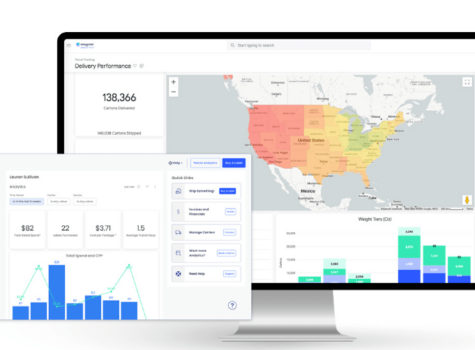

As your shipping operations expand, the amount of data you collect grows too. And while collecting and analyzing data is critical to your success, the sheer volume of numbers can feel overwhelming.
You have the information at your fingertips, but how can you interpret it—and more importantly, how can you turn insights into action?
To make the most of your data, you need a shipping dashboard that presents it clearly.
By building your own dashboard or choosing a pre-built solution, you’ll improve your logistics visibility, optimize your shipping, and shape the customer experience more effectively.
Key takeaways
- A shipping dashboard turns data into action, consolidating real-time shipping metrics into one place.
- By tracking key metrics like total spend, average transit days, and carrier split, you can reduce waste, improve delivery reliability, and boost customer satisfaction.
- Building your own dashboard offers customization but requires technical setup, while pre-built tools like EasyPost’s Luma and EasyPost Analytics deliver instant insights.
What is a shipping dashboard?
A shipping dashboard is a business intelligence tool that displays real-time shipping data in one central location, allowing you to easily spot patterns and potential issues.
With visualization tools like graphs, charts, and more, shipping dashboards help make data analysis fast and intuitive. They help with KPI tracking, carrier performance management, and cost optimization.
In addition to providing package-level information, shipping dashboards also show the big picture. For example, a dashboard might reveal which carriers tend to deliver packages late. With this zoomed-out view of your shipping operations, it’s easy to make small changes with big impacts, such as shifting volume to a regional carrier.
Why use a shipping dashboard? 5 major benefits
Shipping dashboards significantly impact your logistics. They boost efficiency, enable informed decision-making, reduce costs, and more.
More efficient shipping operations
A dashboard helps you monitor key metrics like average time in transit and number of labels purchased, so you can quickly spot delays, bottlenecks, or volume spikes and adjust operations before they cause issues.
Better decision-making
With clear visibility into data such as total spend, cost per package, and carrier split, you can base decisions on facts rather than guesswork.
Lower shipping costs
Tracking metrics like total spend and service split makes it easier to identify where money is being wasted and take action to bring costs down. And lower shipping costs are always a win!
Higher customer satisfaction
Shipping dashboards help you set accurate delivery expectations and proactively communicate with customers about delays, building trust and leading to better reviews.
Greater resilience
Data from your shipping dashboard makes it easy to diversify your carrier strategy and adapt to disruptions, so your business stays steady even when one carrier or route runs into problems.
If you’ve read this far, you’re likely interested in finding the right shipping dashboard for your business.
As you begin researching different tools on the market, it’s important to choose a solution that measures the metrics that are most important to your business.
What metrics should your dashboard track?
While the process of shipping is complex, the goal of shipping is pretty simple: spend as little as possible while also providing a great customer experience. That means choosing affordable shipping services that still deliver on time, with no shipping issues (like lost or damaged packages) along the way.
And the metrics your shipping dashboard tracks should help you meet your goal.
Let’s take a look at an example: the shipping dashboard in Luma by EasyPost. Luma’s AI-driven shipping recommendations all start with historical data, so the Insights dashboard tracks crucial metrics such as the following:
Total spend
What it measures: The total amount your business spends on shipping over a given period across all carriers, services, and destinations.
Why it’s helpful: Tracking total spend gives you a complete picture of your shipping costs so you can stay within budget and find areas where you might save. It also helps you see spending patterns over time, making it easier to forecast future costs and negotiate better carrier rates.
Number of labels purchased
What it measures: The total number of shipping labels you’ve created, usually representing the total number of packages shipped.
Why it’s helpful: This metric helps you understand your shipping volume, which is key for inventory planning and staffing during busy seasons.
It also strengthens your position when negotiating with carriers; higher volumes often qualify you for better rates or extra benefits.
Average transit days
What it measures: The average time it takes for your packages to reach customers from the moment they’re shipped.
Why it’s helpful: Knowing your average transit time helps you set realistic delivery expectations and track how reliably carriers meet them. Plus, it allows you to identify underperforming carriers so you can take action before delivery mishaps affect customer satisfaction.
Cost per package
What it measures: The average cost of shipping each individual order, including base shipping rates, surcharges, and any other fees.
Why it’s helpful: Monitoring your cost per package helps uncover inefficiencies, like using premium services when standard options would do.
This metric is also essential for matching the right carrier and service to each shipment type, keeping costs in check while maintaining reliable delivery times.
Carrier split
What it measures: The percentage of shipments handled by each carrier your business uses.
Why it’s helpful: Understanding your carrier mix helps you avoid over-reliance on a single partner. If one carrier experiences delays or outages, you can quickly shift volume elsewhere.
Service split
What it measures: The distribution of shipments across different service levels—like ground, two-day, or overnight delivery.
Why it’s helpful: By reviewing how often you use each service, you can find opportunities to cut costs without hurting delivery speed.
Peer shipper benchmarking
What it measures: How your shipping performance compares to similar businesses in your industry or with similar shipping volumes.
Why it’s helpful: Benchmarking shows you where you stand against your peers, helping you spot strengths and weaknesses in your shipping strategy.
In this case, comparison isn’t the thief of joy; it’s a valuable way to identify best practices, learn from top performers, and find areas where you can gain a competitive edge.
How to get started with a shipping dashboard
You have two options for implementing a shipping dashboard: build your own or use a pre-built tool from a shipping technology provider like EasyPost. The route you choose depends on your technical expertise, the time you’re able to spend, your budget, and the features you need access to.
In this section, we’ll take a look at each option.
Option 1: Build your own dashboard
If you prefer to build your own dashboard, it’s definitely possible—but it takes some setup and ongoing upkeep. The process starts with choosing a dashboard-building tool.
1. Choose your tools and data sources
Start by choosing where your dashboard will live. Tools like Google Looker Studio, Microsoft Power BI, or Tableau are popular because they connect easily to spreadsheets, databases, and APIs.
You’ll also need to decide where your shipping data is coming from. Most businesses pull it from carrier accounts, fulfillment systems, or shipping APIs, which centralize tracking, label, and cost data in one place.
2. Import and organize your data
Once you’ve chosen your platform, connect your data sources and define the metrics you want to track—such as total spend, average transit days, or cost per package. Before visualizing anything, you may need to clean the data to make it consistent across carriers (for example, aligning date formats or service names). Many dashboard tools can automatically refresh this data daily or weekly.
3. Build, test, and maintain your dashboard
Next comes the design stage—creating charts, tables, and visuals that show your most important shipping insights at a glance. Once your dashboard is up and running, expect some maintenance each month: checking data connections, refining visuals, and updating metrics as your shipping strategy evolves.
While building your own dashboard gives you full control, it also means taking on the technical work of setup and maintenance.
For some businesses, that’s a fair trade-off, but for others, it’s easier to use a ready-made solution that automatically tracks and updates your metrics for you.
Option 2: Use a shipping dashboard tool from EasyPost
If the DIY route sounds like more trouble than it’s worth, consider using a shipping dashboard tool from EasyPost.
Luma
Luma is an AI-powered solution that works hand-in-hand with the EasyPost Shipping API to give everyone from small businesses to high-volume shippers greater visibility into their parcel shipping data.
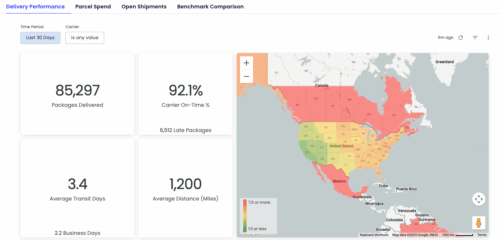
It’s a three-part solution; Luma Insights collects and displays data, Luma Advisor analyzes that data and offers cost-saving recommendations, and Luma Select automatically applies those recommendations to purchase the best labels.
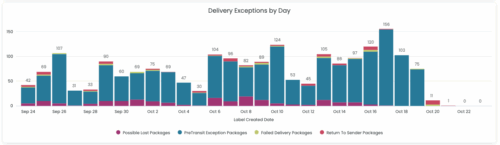
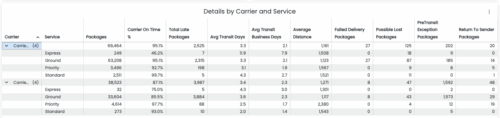
The Luma Insights shipping dashboard makes it easy to:
- Track carrier performance and find the right carrier mix
- Avoid overspending on pricey premium services
- Identify and resolve delivery issues
- Analyze data on the individual package level
- Compare your shipping performance with industry peers
And Luma isn’t EasyPost’s only shipping dashboard tool.
EasyPost Analytics
EasyPost Analytics offers a comprehensive view of your supply chain, pulling in data from your WMS, OMS, and ERP. With EasyPost Analytics, you get access to insights into parcel shipping, omnichannel operations, warehouse performance, and supply chain costs.
Keep reading for an example of how a major brand used EasyPost Analytics to revolutionize their fulfillment process.
Real-world example: Duluth Trading Company + EasyPost Analytics
When Duluth Trading Company decided to build a fully automated distribution center in Adairsville, Georgia, they wanted to do it right. Working with consultants from Summit Advisory Team, they implemented EasyPost Analytics to capture data in real time.
Now, Duluth’s dashboards allow them to make data-driven decisions on staffing, order backlogs, and more. With real-time information on warehouse operations and parcel shipping, paired with the efficiency provided by a new robotics system, they’ve reduced the need for warehouse workers from 100 to just 30 on average—a 70% reduction in labor.
From insight to action: Power your shipping analytics with EasyPost
Now that you know what makes a high-impact shipping dashboard, the next step is implementing the right solution.
EasyPost is here to help! Whether you’re still getting your ecommerce business off the ground or operating multiple warehouses, EasyPost gives you the tools to not only see your data in real time but also understand exactly what it means.
No more drowning in a sea of numbers—with solutions like Luma or EasyPost Analytics, it’s smooth sailing to better shipping.
Smarter shipping with EasyPost
Centralize tracking, rates, and carriers in one dashboard with EasyPost.